On this page
- Why scalable content workflows matter?
- What Is a Content Creation Workflow?
- Why Ad Hoc Content Production Breaks Down at Scale
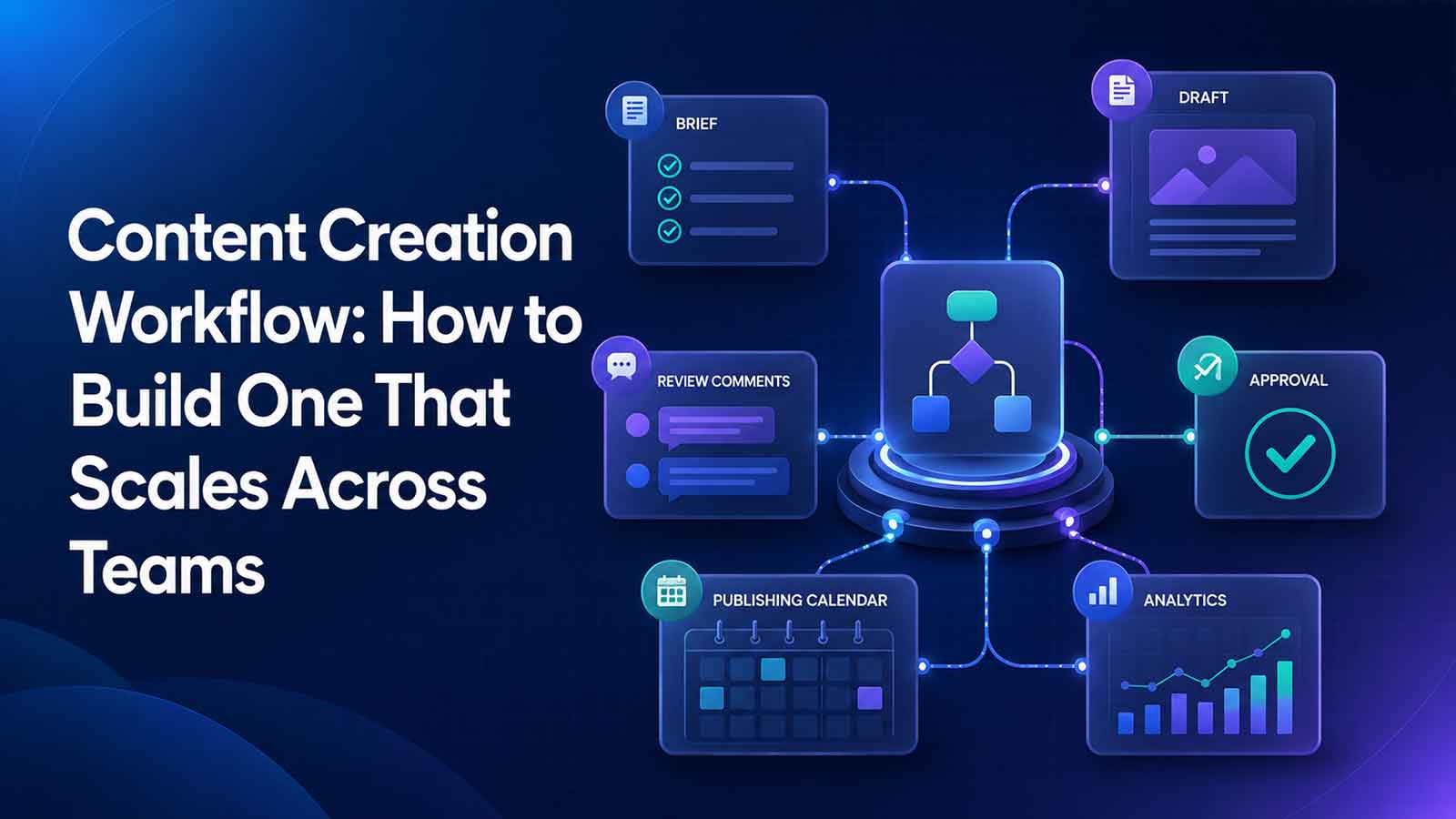
- The Five Stages of a Scalable Content Creation Workflow
- Stage 1: Ideation and Topic Approval
- Stage 2: Brief Creation and Assignment
- Stage 3: Drafting and Collaboration
- Stage 4: Review, Feedback, and Compliance Checks
- Stage 5: Approval, Publishing, and Archival
- How to Design a Content Production Workflow for Multiple Teams
- Defining Roles: Who Owns Each Stage
- Setting SLAs for Review Cycles
- Managing Cross-Functional Dependencies
- Digital Content Workflow: Managing Assets, Versions, and Formats
- Version Control for Content Documents
- Multi-Format Output (Web, PDF, Social, Print)
- Document Management V/S Project Management
- Metrics that show whether your content workflow is working
- Build a workflow people will actually use
- Centralize your content workflow with TeamSync
Knowledge workers lose a surprising amount of time to coordination overhead. Asana reports that workers spend a large share of their day on “work about work,” including status checks, searching for information, and switching between tools, while separate Asana research on collaboration technology found measurable time wasted because of broken tool stacks and digital clutter (Asana, Asana Work Innovation Lab).
Gartner has also estimated that poor data quality costs organizations an average of $12.9 million per year, which underscores how expensive unclear handoffs, missing documentation, and disconnected systems can become when content moves across teams (Gartner). Microsoft’s latest Work Trend research adds another signal, describing overloaded workdays where meetings, messages, and app switching collide and make focused execution harder (Microsoft).
Recent business technology coverage points in the same direction. Major vendors continue to invest in AI-assisted productivity and integrated collaboration experiences that connect conversation, content, and execution more tightly, rather than leaving teams to stitch together separate apps by hand (Microsoft, Zoom). That matters for content teams because the real need is not just faster writing. It is a practical content creation workflow that can scale across teams without creating more meetings, more approval confusion, or more version chaos.
Why scalable content workflows matter?
As content demand grows, teams are expected to publish across blogs, landing pages, PDFs, social channels, email, and sales enablement assets at the same time. A process that worked when one marketer handled everything often breaks once SEO, design, legal, product marketing, and subject matter experts all need to contribute. A scalable workflow is what turns content from a series of heroic efforts into a repeatable operating system.
What Is a Content Creation Workflow?
A content creation workflow is the repeatable sequence of steps, roles, approvals, and tools used to move content from idea to publication and optimization. In practice, it defines how work starts, who owns each stage, what must be reviewed, where files live, and what counts as complete. Strong content creation workflows reduce ambiguity before work begins, not after deadlines start slipping.
Why Ad Hoc Content Production Breaks Down at Scale
Unclear ownership creates bottlenecks:
When responsibilities for topic approval, briefing, and final sign-off aren't clearly assigned, work gets stuck in invisible approval queues.
Inconsistent content briefs reduce quality:
Writers receive incomplete context, designers get last-minute asset requests, and SEO recommendations arrive too late, resulting in duplicated effort and multiple revision cycles.
Fragmented tools hurt collaboration:
Content briefs, feedback, deadlines, and assets are spread across different platforms, making it difficult to track progress and stay aligned.
Limited visibility across teams:
Marketing, design, SEO, legal, and subject matter experts struggle to coordinate when information is scattered, slowing production and increasing communication gaps.
Ad hoc processes don't scale:
Workflows that rely on individual memory, habits, or a few dependable team members become unreliable as content volume and team size grow.
Increased inefficiency and delays:
Poor coordination leads to missed deadlines, repetitive tasks, unnecessary revisions, and slower content delivery.
The Five Stages of a Scalable Content Creation Workflow
Scalable content workflows need clear inputs, outputs, owners, and approval expectations at every step. A simple five-stage model keeps the process easy to understand while still supporting cross-functional complexity.
Stage 1: Ideation and Topic Approval
The workflow starts when teams collect ideas and evaluate them against business goals, audience needs, campaign priorities, and SEO opportunities. The typical owner is a content lead, editor, or marketing manager. Inputs may include keyword research, product updates, customer questions, and campaign plans. The output is an approved topic with a clear reason to exist.
The most common bottlenecks are vague priorities and delayed approvals. If a team cannot tell which ideas support pipeline, retention, or education goals, ideation becomes a backlog of nice-to-have topics with no clear next step.
Stage 2: Brief Creation and Assignment
A standardized brief sets scope before drafting begins. It should define the target audience, search intent, format, primary and secondary keywords, objective, internal links, supporting sources, brand notes, and deadlines. Usually, a content strategist or editor creates the brief, and a marketing lead or stakeholder approves it.
Assignment should happen inside the same workflow where the brief lives. That prevents ambiguity around who owns the first draft and reduces the risk that important requirements get lost between planning and execution.
Stage 3: Drafting and Collaboration
During drafting, the writer researches, structures, and writes the content while coordinating with editors, SEO specialists, and subject matter experts as needed. Design requests, screenshots, quotes, and linked assets should be attached to the same work item.
This is where a centralized digital content workflow helps most. Without one, teams run into version confusion, scattered feedback, and missing context. A connected system like TeamSync’s intelligent repository can help create a single source of truth, while workflow automation can route tasks and approvals without forcing teams to chase updates manually.
Stage 4: Review, Feedback, and Compliance Checks
Review should follow rules, not improvisation. Editorial review, stakeholder feedback, brand review, and compliance or legal checks need defined order, due dates, and completion criteria. Otherwise, reviewers comment on the same issue at different times, or new stakeholders appear late and restart the cycle.
A useful definition of done is simple. The content meets the brief, required reviewers have signed off, requested revisions are resolved, and compliance checks are documented where relevant. For regulated teams, auditability matters as much as speed. That is where tools such as TeamSync’s compliance reporting and audit trail become especially valuable.
Stage 5: Approval, Publishing, and Archival
Final sign-off should trigger publishing, not another round of informal review. After approval, the content moves into the CMS, distribution owners receive handoff details, and final files are archived with approved copy and version history attached.
Archival is often overlooked, but it matters for reuse and accountability. When teams can find the final version, source assets, approvals, and publish date in one place, future refreshes become much easier.
How to Design a Content Production Workflow for Multiple Teams
The best content creation workflows are simple enough to follow and structured enough to scale. A practical design framework usually includes:
Map the current workflow from idea to publication:
Start by documenting every stage of your existing content process, from brainstorming and research to writing, design, review, approval, and publishing. This helps teams understand how work currently flows and highlights areas that need improvement.
Identify bottlenecks, delays, and repeat rework:
Analyze where projects frequently slow down or require multiple revisions. Common issues include unclear approvals, late stakeholder feedback, and duplicated work. Identifying these problems allows teams to address the root causes instead of repeatedly fixing the symptoms.
Standardize briefs, templates, and review checklists:
Create consistent content briefs, writing templates, design requirements, and review checklists that everyone follows. Standardization ensures every team member receives the same information, improves content quality, and reduces unnecessary clarification or revisions.
Define stage-based deadlines and approval windows:
Assign clear deadlines for each phase of production, such as drafting, editing, design, SEO review, legal approval, and publishing. Establishing approval windows prevents projects from sitting indefinitely in review and keeps production moving on schedule.
Centralize communication, files, and status tracking:
Store all project discussions, documents, creative assets, feedback, and progress updates in a single shared workspace. This eliminates scattered information across emails, chat platforms, and spreadsheets, giving every stakeholder complete visibility into the project's status.
Automate repetitive handoffs and reminders:
Use workflow automation to notify team members when tasks are assigned, approvals are needed, or deadlines are approaching. Automating routine administrative work reduces manual follow-ups, minimizes delays, and allows teams to focus on creating high-quality content.
Document the full process in one shared workspace:
Maintain a centralized documentation hub that outlines every step of the content production workflow, including roles, responsibilities, templates, approval processes, and best practices. A documented process makes onboarding easier, ensures consistency, and helps teams scale content production without reinventing workflows for every new project.
Once that framework is in place, teams can manage content workflows more consistently across marketing, design, SEO, product, and compliance without reinventing the process for every asset.
Defining Roles: Who Owns Each Stage
Ownership works best when it is explicit. A lightweight RACI model is often enough. One person is responsible for doing the work, one person is accountable for the outcome, contributors provide input, and approvers give formal sign-off. This keeps handoffs from becoming assumptions.
For example, a content strategist may be accountable for the brief, a writer may be responsible for the draft, SEO and product marketing may contribute, and legal may serve as approver only when required. The point is clarity, not bureaucracy.
Setting SLAs for Review Cycles
Content workflows move faster when review windows are defined in advance. A brief might require approval within two business days. A first draft may have a five-day turnaround. Editorial review may be due in two days, legal review in three, and final approval in one.
These stage-based SLAs keep content from sitting untouched in someone’s queue. If an approver misses the agreed window, the workflow should escalate automatically or move to a backup reviewer.
Managing Cross-Functional Dependencies
Most content teams depend on other teams for expertise, assets, or approvals. Product marketing may need to validate positioning. Design may need lead time for graphics. Compliance may need to review claims. SMEs may need to verify technical accuracy.
Dependencies should be documented directly in the workflow, with visible trigger points and escalation paths. When a dependency blocks progress, the delay should be easy to see, easy to assign, and easy to resolve.
Digital Content Workflow: Managing Assets, Versions, and Formats
A scalable digital content workflow includes more than tasks. It also needs asset storage, naming conventions, permissions, file governance, and channel-specific production rules. That means teams should decide where working drafts live, where final assets are stored, and how permissions are applied before volume increases.
Growing teams often need connected collaboration plus document governance. TeamSync’s platform and capabilities overview are built around that idea, keeping files, workflows, and team execution linked rather than scattered.
Version Control for Content Documents
Version control should not depend on people remembering to label files correctly every time. Teams need one source of truth, consistent naming conventions, locked final versions, and visible history for comments, edits, and approvals.
This matters even more when multiple stakeholders touch the same piece. Without audit visibility, it becomes hard to answer basic questions like which draft was approved, who changed a key claim, or whether the published version matched the signed-off copy.
Multi-Format Output (Web, PDF, Social, Print)
One source article often becomes several assets. A blog post may also need a PDF handout, social snippets, a webinar follow-up, and print-ready sales collateral. That only works smoothly if the workflow accounts for format-specific owners, asset requirements, review steps, and publishing destinations.
Repurposing should feel like a planned extension, not chaotic duplication. The workflow should define what gets adapted, who owns each channel, and which approvals carry over versus which need to be repeated.
Document Management V/S Project Management
Aspect | Document Management | Project Management |
Primary Purpose | Organizes, stores, and manages documents and digital files. | Plans, tracks, and manages tasks, timelines, and project progress. |
Main Focus | File storage, version control, and document accessibility. | Task execution, collaboration, deadlines, and resource management. |
Key Features | Document repositories, version history, file sharing, access control, and search functionality. | Task assignment, project timelines, progress tracking, workflows, reminders, and reporting. |
Collaboration | Enables teams to review, edit, and share documents. | Coordinates work across teams by assigning responsibilities and tracking completion. |
Visibility | Shows the latest document versions and edit history. | Provides visibility into project status, milestones, blockers, and deadlines. |
Document tools are great for storing files and preserving records, while project tools help teams manage tasks, deadlines, and progress. As content operations grow, relying on separate tools often creates silos and slows collaboration. A connected platform that brings together document management, task tracking, team communication, and approvals keeps the entire workflow in one place, making it easier to collaborate, stay on schedule, and deliver content efficiently. Teams looking for an all-in-one solution can explore TeamSync to centralize their content and project workflows.
Metrics that show whether your content workflow is working
Cycle time: Measures how long content takes to move from idea to publication.
On-time completion rate: Shows whether deadlines are realistic and consistently met.
Revision rounds: Indicates how effective briefs and early reviews are by tracking the number of revisions required.
Approval lag: Highlights where content is waiting for approvals instead of progressing through the workflow.
Publishing velocity: Tracks how much content is published over a specific period to measure output.
Performance feedback loops: Connect published content to actual results, helping teams refine briefs, prioritize better topics, and continuously improve the workflow.
A strong content creation workflow doesn't just move faster; it balances speed with quality and becomes smarter through continuous iteration.
Build a workflow people will actually use
A scalable content workflow isn't about adding more processes; it's about removing unnecessary complexity. The best workflows are clear, documented, role-based, and easy for every team member to follow. They define how work moves from idea to publication, who owns each stage, where assets are stored, and how reviews and approvals are handled.
When everyone works from the same system, collaboration becomes faster, visibility improves, and projects move forward with fewer delays and revisions. Instead of constantly fixing process gaps, teams can focus on creating high-quality content. As your organization grows, a well-designed workflow ensures your content production scales efficiently, without increasing confusion, bottlenecks, or operational overhead.
Centralize your content workflow with TeamSync
Ready to turn a messy content process into a scalable system? Review your current workflow, document each stage, and centralize tasks, approvals, and communication in TeamSync so your team can create content faster with fewer bottlenecks.